
The conversation around AI in the classroom is getting louder, and so is the concern about AI deskilling teachers and students alike. But here’s what I believe: avoiding AI doesn’t protect us from deskilling. Teaching AI literacy does. In this post, I’m sharing exactly how to use AI ethically as a teacher, why ethical AI use for teachers means being transparent with your students, and what that looks like in my actual classroom.
Table of Contents
You’ve probably heard the concern by now. Maybe you’ve read it in an article, listened to it on a podcast, or had a colleague bring it up in the workroom. The worry goes something like this: if teachers and students lean on AI too much, we’re going to lose the skills that make us good at what we do.
They’re calling it “deskilling.” And it’s not an unfounded fear.
A recent piece in the Communications of the ACM pointed to evidence of deskilling across multiple fields, including education. Researchers have found that over-reliance on AI can erode critical thinking and decision-making (not just in students, but in professionals across industries). Yale’s teaching center has documented students developing what they call “illusions of understanding” through AI use, where confidence paradoxically rises while actual mastery slips away. And a 2024 Cengage report found that 55% of recent graduates said their academic programs hadn’t prepared them to use generative AI tools effectively.
That last one made me pause.
Not because AI is dangerous. But because the solution to all of these concerns isn’t to ban AI. It’s to teach people how to use it well.
And I don’t think we’re doing that yet.
The AI Elephant in the Classroom: Teaching AI Literacy
My freshmen said something concerning the other day. This year I’m teaching a new World Geography course. I showed my students a presentation I’d built. I typed the content myself (I showed them in the version history) and then I used the built-in AI feature to “beautify this slide.” It’s Google, so it’s powered by Gemini (look for the banana :)).
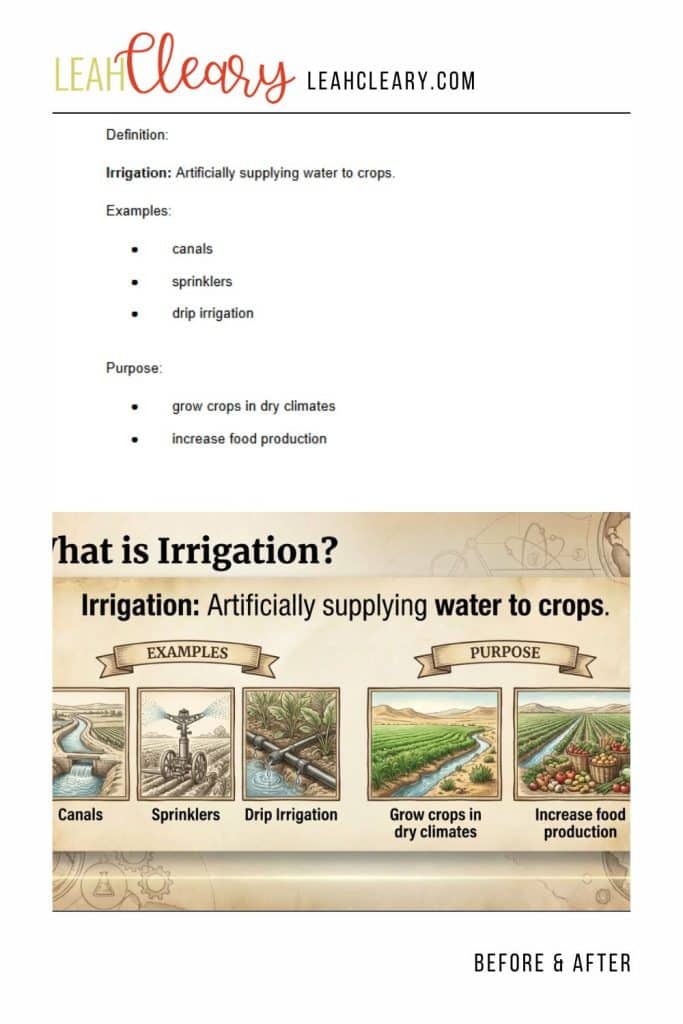
When I showed them the version history and walked them through exactly what I did and didn’t do, their minds were blown. Not because I used AI. But because I was telling them I used it.
They said they’re pretty sure a lot of their teachers use AI but won’t admit it and then forbid them from using it at all. I want to be careful here, because I know a lot of teachers are in a tough spot. Policies are inconsistent. Administrators are sending mixed messages. The landscape changes every few months. I’m not here to judge.
But I do think that transparent AI use is part of ethical AI use. And if we’re using AI and hiding it, we’re not just missing a modeling opportunity, we’re sending a message to students that AI’s something shameful, something you do in secret. That’s the opposite of what they need to learn.
Ethical AI Use for Teachers: A Framework I’ve Been Using Since the Beginning
When ChatGPT first burst on the scene, I spent a lot of time thinking through where the line was. I wrote about it, I spoke about it at conferences, had lots of conversations with other teachers, and I landed on a framework that I’ve kept coming back to ever since (you can read an earlier version of my thinking here):
Unethical use is using AI to create, to generate the product you should be producing yourself.
Ethical use is using AI to plan, edit, get feedback, and augment, to make your own thinking stronger (like I used it for feeback on this post–very meta).
The slide example above is ethical use. I wrote the content. I used AI to make it more visually appealing. My thinking, my decisions, my lesson. AI just helped with the presentation layer.
And here’s the important part. This distinction matters just as much for students as it does for teachers. When I tell a student, “Write your essay. Then ask AI for specific feedback on how to improve it, not to rewrite it for you,” I’m teaching them to use AI as a tool, not the tool. That’s a completely different skill than copy-pasting a ChatGPT response into a Google Doc and calling it done.
The first prepares our students for a workforce where AI literacy is increasingly non-negotiable. The second leaves them exactly where those 55% of graduates ended up–unprepared.
I’m Not on Autopilot. Here’s What That Looks Like.
One of the biggest concerns I hear about teachers using AI for grading is that you’re just outsourcing your professional judgment. You’re letting the machine decide.
I want to push back on that, but I also want to acknowledge that it’s a real risk if you’re not intentional.
I use a Custom GPT I built for grading AP World History essays. Here’s an example of what that looks like in practice.
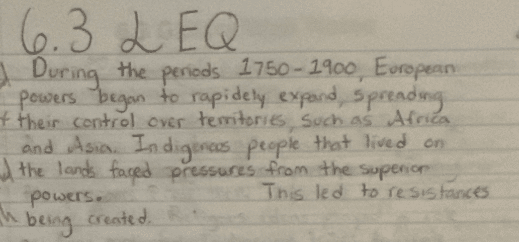
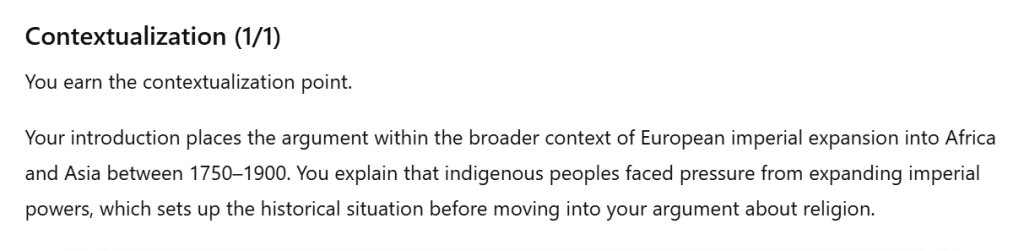
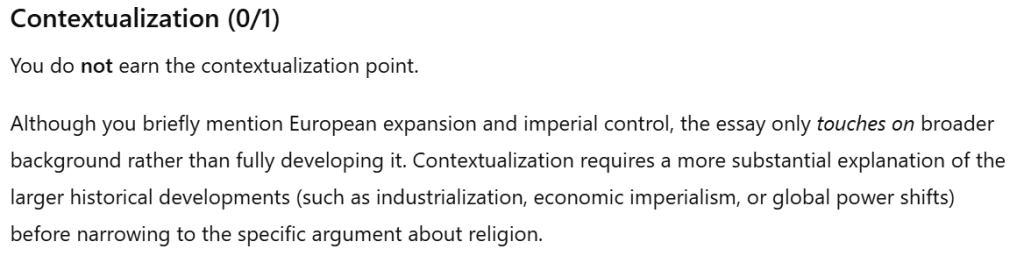
In the second example, the GPT correctly identified that the student only “touched on” broader context rather than fully developing it, which is the distinction that separates earning the contextualization point from missing it. That’s a nuanced call.
Here’s the important part. I didn’t just look at the score and move on. I recorded my own reasoning for ChatGPT (recording is key–speaking is such a huge time-saver over typing for me).
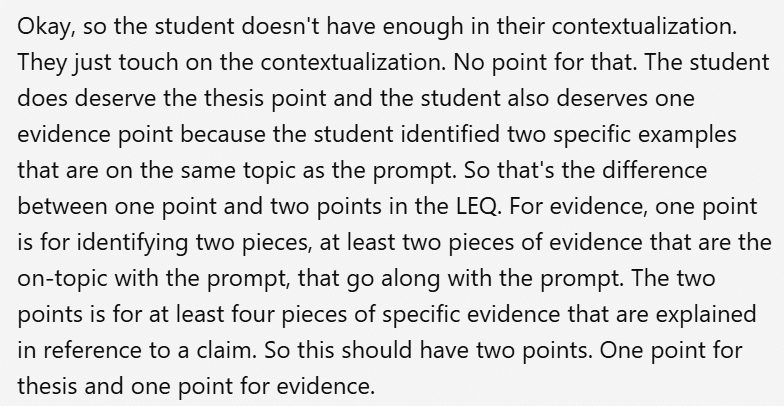
Sometimes I agree the GPT. Sometimes I don’t. And when I don’t, I’m the one who decides. The GPT gives me a starting point and saves me time on generating written feedback. My professional judgment’s still the boss.
That’s not unskilling. That’s a new skill. And I believe it’s one worth developing.
If you want to try this approach with your own essays, you can sign up to access my Custom GPT for Grading here:
Grab Your Custom GPT for Grading!
The Real Unskilling Risk
Here’s the argument I want to make: if we don’t develop skilled, ethical AI use, we invite the unskilling everyone’s afraid of.
Banning AI doesn’t protect students from it. It just means they encounter it without any instruction, framework, or modeling. We saw this play out with social media. Schools blocked it, ignored it, and by the time we started having real conversations about digital citizenship and mental health, the Millennials had already been shaped by platforms they’d never been taught to navigate critically.
We should be wary of making the same mistake with AI.
The students sitting in my World Geography class this year will graduate into a workforce where, according to Gallup, AI use at work nearly doubled between 2024 and 2025. They need to know how and when to use it. They need to know how and when not to use it. And this is critical–they need to see adults modeling both scenarios.
That’s our job. Not despite AI. But because of it.
What Teaching AI Literacy Looks Like in Practice
If you’re wondering where to start, here’s what I’d suggest.
Be transparent with your students about how you use AI. Show them your process, including what you didn’t hand off to AI (and explain why you didn’t). Let them see the version history, the prompts, the before and after.
Give them a framework. The ethical vs. unethical distinction (creating vs. planning, editing, getting feedback, augmenting) is something students understand concretely when you model it and refer back to it. Make it part of your classroom culture.
Whether it’s grading, lesson planning, or slide design, show students what it looks like to use AI as a starting point or for fine-tuning and then bring your own expertise into the equation. Let them see that you agree with it sometimes, override it others, but that you’re always in charge.
For more on how I use AI in the classroom (and how you can too) check out this post: AI Tools for Teachers.
The conversation around AI in education’s only going to get louder. Current classroom teachers deserve to play a key role in shaping it. Join the conversation today.


